
NOTICE:
In version 1.5.0, the default color themes were updated. If you prefer the original themes, here they are (just copy and paste into ‘Color setup’):
mono
63, 0,63, 0,63, 0,63, 0,63, 0,63, 0,63, 0,63, 0,63, 0,63, 0, 0,63,63, 0,63, 0,63, 0,21,21,21,21,21,21,21,21
red
48,32,62,56,48,32,62,48,63,32,48, 0,62,48,63, 0,48,32,62,48,48,56,62,32,62,32,63, 0,21,21,21,21,21,21,21,21
orange
60,36,63, 0,60,56,56, 0,63, 0,62,56,60, 0,56, 0,63, 0,63, 0,21,56,63, 0,63, 0,63, 0,21,21,21,21,21,21,21,21
yellow
61,56,63, 0,60,56,56,52,63,56,62, 0,60, 0,63, 0,61, 0,61,52,56,56,61, 0,61, 0,63, 0,21,21,21,21,21,21,21,21
green
12, 8,62, 4,12, 8,60,13,12, 8,63, 0,61, 5,63, 0,12, 8,12, 8,62,12,12, 0,12, 0,63, 0,21,21,21,21,21,21,21,21
aqua
30, 5,63, 0,30, 5,63, 0,30, 5,63, 0,43, 0,63, 0,30, 5,30, 5, 5,47,30, 0,30, 0,63, 0,21,21,21,21,21,21,21,21
blue
11,11,63, 1,11,11,60, 6,11,11,63, 0,62, 6,63, 0,11,11,62, 6,62,47,11, 0,11, 0,63, 0,21,21,21,21,21,21,21,21
pink
51,34,63, 0,51,34,28, 0,51,34,63, 0,28,49,63, 0,51,34,51,54,34,59,63, 0,63, 0,63, 0,21,21,21,21,21,21,21,21
How it works:
You can add a touch of color to Instinct Pro by choosing one of the predefined accent options (Red, Orange, Yellow, Green, Aqua, Blue, Pink). For more advanced customization, you can edit the ‘Color setup’ text parameter in the settings. To define custom colors, use the following numbering:
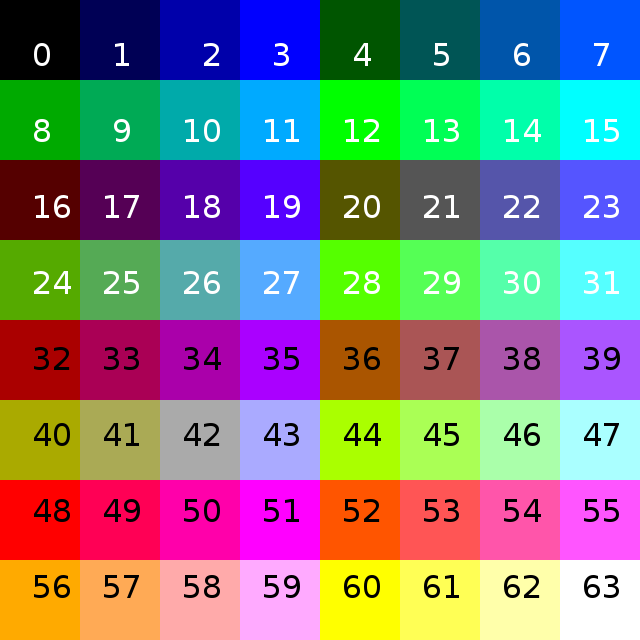
The custom color text defines the colors in the order shown below:
1. Hours
2. Minutes
3. Arc 1
4. Arc 2
5. Circle highlight
6. Circle spokes
7. Icons
8. Data
9. Seconds
10. Graph line or area (does not affect colors graph)
11. Line gauges background
12. Top gauge foreground
13. Bottom gauge foreground
14. Circle number
15. Hours LCD shadow
16. Minutes LCD shadow
17. Circle number 1 LCD shadow
18. Seconds LCD shadow
Each element has two entries, one for black and one for white background. The numbers must be separated by commas.
So for example, if you want to customize the yellow theme to get red hours, green minutes and blue seconds:
Before: 61,52,63, 0,52,52,56,56,63, 0,61, 0,61,16,63, 0,61, 0,52,52,32,21,56,56,56,56,63, 0,21,21,21,21,21,21,21,21
This is the default yellow theme:
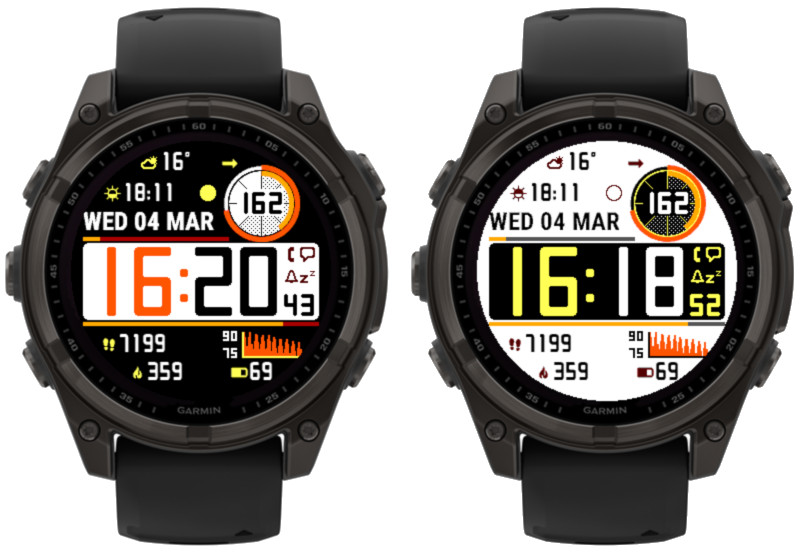
After: 48,48,12,12,52,52,56,56,63, 0,61, 0,61,16,63, 0,11,11,52,52,32,21,56,56,56,56,63, 0,21,21,21,21,21,21,21,21
After saving the settings with this modification you will get:

Important:
- Please note that due to the way Garmin’s Connect IQ settings work, you can’t switch the theme and make changes to it in the same session. After changing the theme to another one, save the settings first. Only then open them again to customize the newly applied theme.
- To discard your changes and revert to the default theme, simply delete the ‘Color setup’ text and save the settings.