
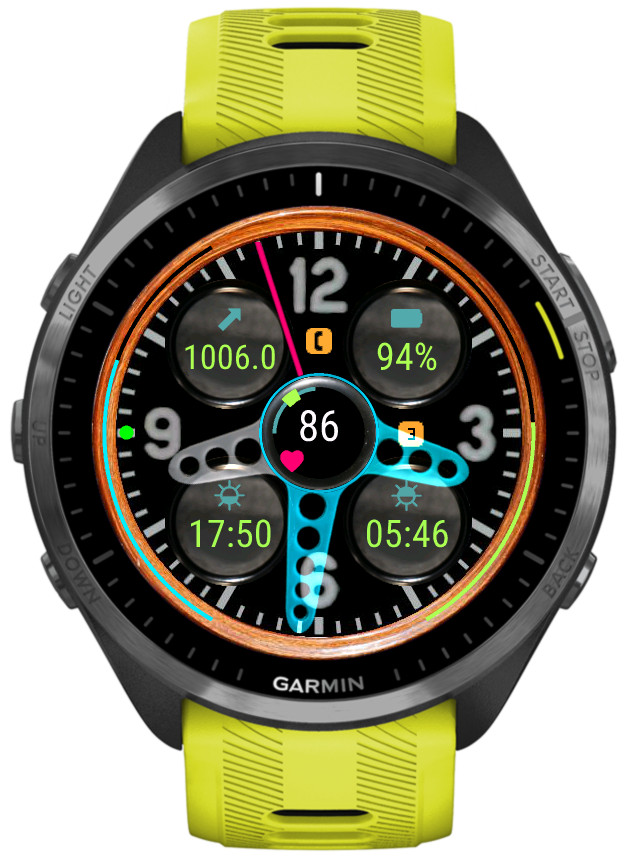
A watch face inspired by a classic car dashboard with wide choice of data options
- 6 customizable color themes
- 5 data fields
- 4 gauges
- 50+ data points (depending on the device)
- 4 status icon fields
- 4 configurable data sets (switchable by touch, on the watch settings or Connect IQ)
- Extra hand for UTC or alternate zone time
- 4 AOD modes with 3 brightness levels
Data sets
For easy access to more data than can be simultaneously shown on the screen, it is possible to switch between 4 ‘data sets’. Each set contains its own setup of data fields, gauges, icons and extra hand.
Switching between sets can be done in Garmin Connect IQ app, in the watch face ‘Customize’ menu, or by touching the 12, 3, 6, 9 hour marks (if enabled in the settings).
If switching by screen touch is enabled, an indicator dot will appear on the corresponding hour mark to show which data set is currently active.
The 4 sets are predefined with the focus on general, basic health tracking, fitness, weather. But each set can be fully configured to your needs and the configuration will be kept while you switch between sets.
Color themes customization
The colors of different screen elements are customizable, however for the hands the customization color does not replace the basic color but adds to it.
The colors are entered in the RGB hexadecimal format where each two hex digits correspond to the Red, Green and Blue component level.
Weather
The weather source can be either Garmin or Openweathermap (OWM). OWM is generally more accurate and provides some options that Garmin does not. However, in order to use it, you need to provide your own OWM API key (3.0 compatible).
Unlocking
This watch face is fully functional without payment. However, some options will trigger a floating padlock icon if they are used without a valid unlock key. These options are marked with a ‘star icon’ in the settings and include:
-switching data sets
-switching color themes
-changing AOD brightness
-applying hands blending mode
-‘live’ HR and solar charging
-extra hand
You can help the developer and get an unlock key by following this link https://reed.works/rw-rw-unlock/
It can be done directly from the settings by pressing on the link and choosing ‘Open’ from the menu that pops up.
Helpful links
Download: https://apps.garmin.com/apps/c4bd1a0d-a26d-4fbe-80a3-16827c1f8c01
User manual: https://reed.works/rw-retro-wheel-user-manual/