
Analog watch face, Instinct style.
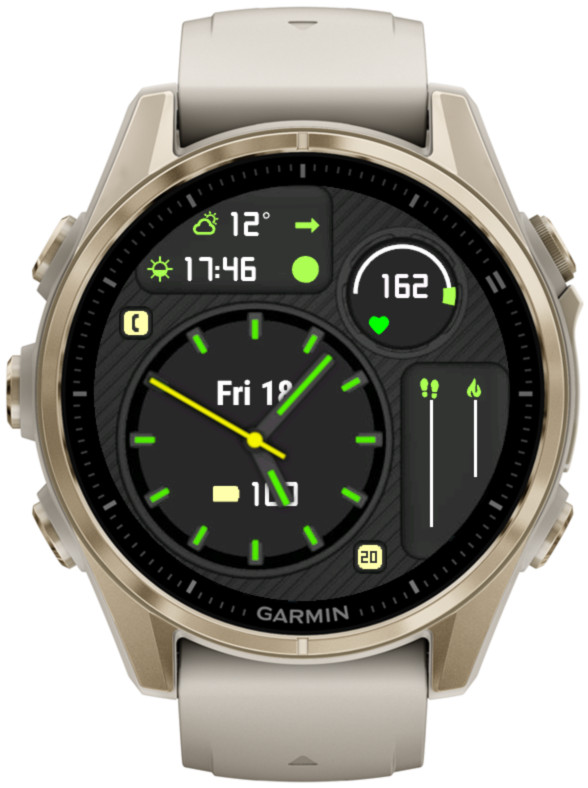
Features
- 7 data fields with up to 50+ options each
- 2 sliders and 2 arc gauges showing level/progress of up to 25 data choices
- 4 configurable status icons (phone, notifications, alarms, do not disturb)
- 4 configurable datasets switchable by screen touch, gesture, watch face ‘customize’ menu, or the Connect IQ app
- Battery saving options
- 10 customizable color themes, with separate colors for AOD mode
- Choice of Garmin* or OWM weather
- Always on second hand*
- Live HR and solar charging options for circle number and arc 2*
(*) On compatible devices
This watch face is free to download and use. The ‘premium features’ are always accessible, but when the free unlock promotion ends, a floating padlock icon will appear on the screen several seconds after gesture if no valid unlock key is entered.
To download, visit Garmin app store here.
You can support my work by obtaining an unlock key here.
The user manual is available here for devices compatible with Connect IQ 4.x, and here for other devices.

Hello Reed,
Thanks for your reply. I’m usaing an Instinct 2 (Solar). I was not aware of the pixel resolutions of the various models.
Best regards, Patrick
Hello Patrick,
Thank you for your comment. The answer may depend on the device that you have.
What is your watch model?
Kind regards,
Reed
Thanks for the Instinct Analog style. I am quite happy with it. I have configured the heart rate in the circle. Would it be possible to use a larger font there to make the numbers easier to read without glasses? It would be perfect if the size of the numbers were scaled to the number of digits (even for large numbers like the altitude). Yours sincerely, Patrick
Thank you for your observation! This was an omission in the document editing – currently there is no possibility to change any settings on the watch in Instinct Analog.
And it was done deliberately. Adding this capability to the watch face takes away some memory that could be used for other purposes.
I have no way of checking this accurately, but my feeling is that not many people care about changing settings on the watch.
“Changing settings on the watch” is listed under Contents but has no corresponding info field. Does changing the setting on the watch work only for Instinct Pro? I see I can change the data set for Analog from Settings. That works.
Thank you! I think this is the first time somebody pointed out an error in my documentation 🙂
It’s a great help.
I don’t think this line belongs in the Analog documentation under Seconds:
“Note that when the seconds are hidden, “Data right” field can be used to display additional information.”
I’m enjoying both Instinct Pro and Instinct Analog.
Thank you! Mix means black with white. Sorry for it being misleading, I just chose the shortest description I could think of as longer text uses more memory which is scarce on some devices. It does not change by itself. But you can choose a different backgrounds for day and night.
Great watch face! What does “mix” exactly mean? How often does the color change?
Hello and thank you for your feedback! I think this should be possible. If I don’t encounter any unexpected difficulties, will try to add it in the next update.
I really like this watch face. It has so many features to offer, and you can see the most important information at one glance. However, I was wondering if it was possible to display the average heart rate of the last 4 hours in the circle instead of the current heart rate.