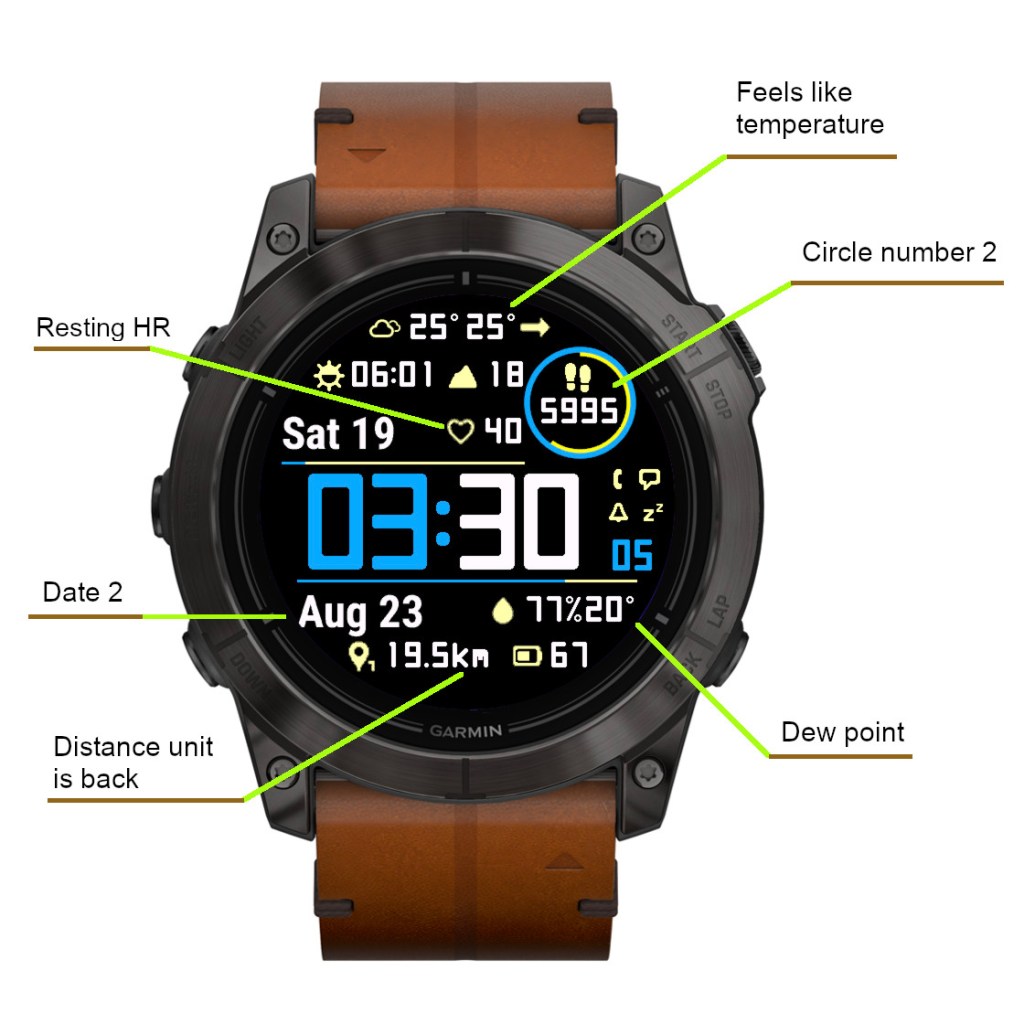
Instinct Pro version 2.6.0

What’s new

This release adds some more data points and ways of presenting them.

New data

  • Resting HR
  • Climb (m or ft)
  • Option to show weather with feels like temperature in addition to current temperature
  • Option to show humidity with dew point (OWM only)
  • Second date field allowing different date format (separated by | symbol in date format field)

Alternate circle number format

The existing ‘Circle number’ option was renamed to ‘Circle number 1’ and another option called ‘Circle number 2’ was added.

‘Circle number 2’ generally allows the same choice of data as the main data fields (except date and weather location), and uses the same font and icon.

If ‘Circle number 1’ is set to ‘Off’ and ‘Circle number 2’ is set to something else, the ‘Circle number 2’ will be shown in the circle. Note that you can alternate the circle number format between different data sets.

Resting Heart Rate

On compatible devices (Connect IQ 3.2.0 or higher) it shows “The user’s seven day average resting heart rate (bpm)”. On older devices it shows “Heart rate in beats per minute (bpm)”, whatever that is (It could be entered manually or otherwise the watch has some obscure way of calculating it).

Second date field

An additional date option called ‘Date 2’ was added. The date format for ‘Date 2’ is defined after the format for ‘Date’ in the ‘Date format’ field. The two formats are separated by the “|” symbol.

So for example, in the picture shown above, the ‘Date format’ is “n D|N y”.

There are at least two ways it can be used:

1) A long date can be split in two to make it fit better on the screen
2) Alternate longer/shorter date can be used for different data sets to make it fit with the defined layout

Distance units

In an earlier update, the distance unit (km or mi) was removed to reduce the space occupied by the distance field. But this turned out to be unpopular with some users, so now there are options to choose the daily/weekly distance with or without the units.

Added existing data options in new places

  • Battery days option added for Data right or Data left (depending on the device)
  • Solar intensity option added for top and bottom lines

Instinct Pro version 2.5.0

What’s new

Open Weather Map (OWM) Air Quality Index

The scale ranges from 1 to 5:

1 = Good
2 = Fair
3 = Moderate
4 = Poor
5 = Very Poor

As with other OWM data, this may or may not work, depending on your API key validity, which depends on the evolving OWM policies.

Currently, it should work with a “Current weather and forecasts collection” key created before August 2022, or with a “One Call by Call” subscription (free up to 1000 API calls per day – Instinct Pro will not exceed 300 calls per day).

Instinct Pro version 2.4.0

What’s new

Dataset switching by gesture

You can choose how many datasets you want to switch by gesture (from 0 to 4).

Switching datasets requires double gesture, to minimize unintended switches when you move your hand for other reasons than looking at your watch.

When you raise your wrist the first time, an indicator bar appears between Data 3 and Data 5. It shows which data set is currently active – the number of bar segments (1 to 4) reflects the currently active set.

While you see the bar, move your wrist again to cycle to the next data set. This movement must be completed within the ‘Gesture timeout’ defined in the settings, or before the bar disappears. If you find it difficult to get the dataset to switch, try making the timeout longer.

Waking up to full display by gesture in power save mode

If you set ‘Full on gesture’ to ‘On’, wrist movement while in power save mode will activate the regular full screen display for about 10 seconds.

Two configurable data line gauges

They are located above (Top line) and below (Bottom line) the time and present the same collection of data as the circle arcs or highlight.

3 new entries have been added for line gauges at the end of the ‘Color setup’. First for line background color (applicable to top/bottom), second for top line foreground, last for bottom line foreground (foreground color reflects the selected data current level/progress). Remember that each entry has two colors for black and white screen background (this applies to AMOLED devices too even though white screen background is not supported).

If you don’t want to see these new data lines, on monochrome devices just set them to ‘Off’. On color devices, the background color will still be visible, so to hide it completely, you will need to edit the ‘Color setup’ to change the line background colors to black and white (white does not apply to AMOLED devices).

For example, with yellow accent:

Before: 61,56,63,0,60,56,56,52,63,56,62,0,60,0,63,0,61,0,61,52,56,56,61,0,61, 0

After: 61,56,63,0,60,56,56,52,63,56,62,0,60,0,63,0,61,0,61,52,0,63,61,0,61,0

Live HR in the circle

This is the new default setting for the circle number. If you have ‘Live HR’ selected for more than one data field, only one of these fields will be updated live, the rest will update according to your ‘Data update’ setting.

Removed the gap between hours and minutes in 24h time format
PHP Code Snippets Powered By : XYZScripts.com