
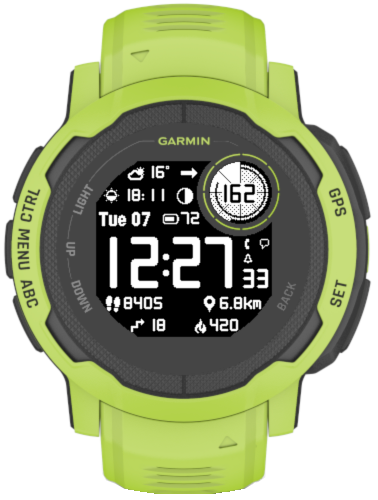
A new watch face from Reed Works!
Created to complement the unique design of this beautiful watch, or to provide a similar experience on other devices.
- 10 (or more on some devices) general data fields with 40+ options each
- Circle field with 4 configurable data: 3 graphical and 1 numeric
- Extra data field shown when the seconds are inactive
- Status icons (phone, notifications, alarms, do not disturb)
- Graphs (options depend on device)
- 4 configurable datasets
- Color accent options*
- Switching of datasets and color themes on the watch, without a phone*
- Battery saving options
- 4 background modes**
- 3 Circle highlight levels**
- 3 time font options
- Choice of Garmin (on compatible devices) or OWM weather
- Live / Real time heart rate
*On compatible devices only
**Not available on AMOLED devices
To download, visit Garmin app store here
To purchase an unlock key, visit here.
A user manual is available here.
For devices that support color, see the instructions here.

Hello,
The difference between Light, Medium and Heavy should be a different density of the dots highlighting the active area.
It may not be obvious in some poor light conditions.
Hello,
What is the difference between Light and Heavy in the Circle highlight setting of Instinct Pro Classic?
Hello and thank you!
The first thing you see in the description of Instinct Pro Classic is “On Instinct 2 family, this is a clone of Instinct Pro 2.3.0, but with the original data font.”
The first thing you see in the Instinct Pro manual is “This manual covers all devices that Instinct Pro runs on. Since different devices have different capabilities, not every feature described below may be available on your device.”
Instinct Pro Classic is not abandonware, it is being maintained at the same pace as Instinct Pro, if something needs to be fixed. It’s just that both of them have been ‘frozen’ at a different stage during the development so that no more new features are being added on Instinct 2 family.
Classic has a prettier data font and I think it is likely to be more battery friendly. The font is the reason why Classic was created. Many people prefer to have this font rather than more features.
And you don’t need to buy to try. All the features work without an unlock key, you just get the unlock icon popping up. This is also explained in the description.
I try to be as clear as I can, but I can’t force people to listen to what I have to say 🙂
I think this is a great watch face! arguably, i think it should be the built-in and default one that comes with the instinct series.
I have been using this for weeks (after moving from a casio g-shock) and it is instilling more confidence to buy a second garmin watch for my partner… and of course, a watch face from this same developer, Reed Works.
1 small feedback for any future development.
there are 2 versions of this watch face. the ‘standard’, and the ‘classic’ (aka old version that is no longer being maintained). I believe the classic face should be given for free to anyone who buys the standard watch face, because I actually bought the classic, and then the standard watch face, 1 transaction after another. and they really essentially are the SAME watch face! having paid exactly double ruined the initial experience, to the point that I would NOT have recommended this to anyone else (due to this buying process).
however, as a developer myself, I am happy to support independent developers, and I can see that it would have taken me FAR longer to build it and maintain it myself (even if the price is DOUBLED by my purchase mistake, and even if the price is per WATCH and not per user!)
so my only complaint in a nutshell:
as I said, I am a developer, and I initially and crucially paid for the ability to display the day of week, month, and day at the same time, on the face. (eg “Mon, 01-31”). and I bought the ‘classic’ version. and as a developer, my eye for uppercase/lowercase is highly tuned, and I noticed that the ‘standard’ version, mentions in its user manual it has support both upper case and lower case, and the ‘classic’ version did not mention this at all. so i assumed that all I had to do, was to buy the ‘standard’ version. however, on my instinct 2x solar, both of the versions do not actually support uppercase/lowercase day of week (eg “Mon” and “MON”), and hence, even after carefully reading the quite comprehensive and formally documented manual, I did not even get what I paid DOUBLE for. (you think you know how much people are willing to pay for, and for what, until you read something like this from me! and it was that permissible comma “,” in the date, for me, that meant i could lay the issue to rest.)
hope you can take this in buyer experience on board – even if you don’t fix the product – at least fix the user manual – to prevent the negative initial experience that I had.
i don’t believe you want to be known as the watch face developer who charges people TWICE, once to sell old versions, and once again (for new versions that may or may not work with their watches), and makes the confusing buying process a hit and miss, even if you end up making slightly more revenue as a result. and then all over again, when people replace their watches. and why not provide a simple table that says buy standard/classic if people if they have so-and-so watch model? in case anyone is reading this, I bought both versions for the instinct 2x solar, and I am using only the standard version, and it is FINE.
as I said, the last few weeks have been great! no glaring impact to battery life, etc. and everything I could want is on the screen. and able to be visually arranged, by priority, FOR ME. which is 1 body battery, 2 steps, 3 date, 4 time, 4 sunrise/sunset, 5 weather temp, 6 chance of rain %.
garmin should hire you! seriously. as they would have more highly satisfied customers, and they would help to sell more watches.
Thank you for your feedback. I have looked into this and concluded that it is not technically possible or too complicated to attempt within the constraints of this design. Please note that the default watch faces are not running on the Connect IQ system, so not everything they do is possible to replicate on Connect IQ.
I’m sure there is a technical reason it’s not possible, and I’m not even sure if new features are being added, but if it is, I’d love to see the option to have Seconds available in the circle window (Instinct 3 Solar) similar to the default watch faces.
Hello,
Sorry, I’m not sure what you mean.. Are you referring to sleep score? If so, this unfortunately is not available to Connect IQ apps.
Hi. The email was sent to you twice already. Have you checked your spam folder? Your unlock key for token 852409 is 489374830454
Paid for InstinctPro face unlock key, but never received any email with the key! And yes, I did provide the unique unlock code from my watch settings and I also provided my email. Have emails support twice….. no replies.
Hey! Do you think you could add sleep core to the options? Thanks!
Hey!
On which device?
Hey there! I have been trying to use the “date 2” feature to write a simple message in a different datafield but the app doesn’t show that option on the menu. Was it taking off? I use the | when customising the date but there is no option to add the “date 2” to a data field.
Thank you for your feedback and your support! I’m sorry but as explained in the description on the download page, it is not possible to add any enhancements to this watch face on Instinct devices because of their limited memory. The barometer trend is based on the running average of the pressure readings taken within the period defined in “Baro tracking minutes”. The default value for that setting is 10 minutes, that’s why it reacts to pressure changes quickly. For a longer view, just change this to the duration of your choice.
Thanks for the great watch face. Went for the lifetime option. But would it be possible to extend the barometer graph, i.e. to 12 or 24 hours? Currently, the two hours graph is almost useless for determining weather changes (so I still need to go back to the built in 24 hour view in my Instinct 2S) . Also, what data (and time frame) is the barometer trend arrow based on? It seems to me pointing downwards if there’s just a minor pressure drop (e.g. 0.x) in the graph but this does not necessarily tell me that rain is coming. Any insight would be appreciated.
Do not Disturb setting of the watch.
what is DnD in power save?
Yes. It is in the description of the version 3.0.3 and I have also added it in the IMPORTANT section.
Hi, do you mean this download page: https://apps.garmin.com/en-US/apps/cb5955f7-262f-4d09-bae9-7e419dc11f70 ?
Hi. Thank you for your comment. If your device is Instinct, unfortunately the answer is no, as explained on the download page.
Hi, would it be possible to display infinity ∞ instead of 365 days on unlimited charge? Thank you.
Yes, for the sun charging is the best function with 0.1 and battery days. Thank you very much.
Thank you very much for your effort. I really liked it and it made sense to see the sun charging. If it’s optional, users can change it after all. Have a nice day
Hi,
The problem is that if I just make it back as it was in the previous version, there will be other people complaining that they don’t want to see the 0.1%.
This is the reason why it was removed in the first place. From the feedback I’m receiving it looks like most people prefer it without the decimal point.
To make everybody happy I need to provide an additional option which can’t be done without increasing the application size.
Anyway, I will have a look into this for the next update to see if it could be done safely without jeopardizing the app’s stability, but I can’t promise today that this can be done.
Hi, I understand so Instinct devices has been frozen to avoid crashes caused by low memory, but it worked in previos version. If it was possible to insert the value of battery level with 0.1% accuracy + days into the data field for the Instinct 2X Solar, It was very usefull. Could you add this data field back? Thank you very much.
Thank you for your comment.
Currently it is not possible, it is either one or another.
It could be done, but unfortunately not on Instinct devices due to their limited memory.
Is it possible to have Dataset “Opt1” set to Garmin Weather and have a second Dataset “Opt2” set to OWM. I tried to set it up that way but it was not possible on the Instinct 2X Solar. Do you think you can add that feature in the future? Thanks
Thank you for your comment.
In general, as announced on the download page, the development for Instinct devices has been frozen to avoid crashes caused by low memory.
While some minor changes might still be possible, I have to be very careful, both in choosing what to change, and in making sure it is safe.
Would it be fantastic if it was possible to insert the value of battery level with 0.1% accuracy + days into the data field for the Instinct 2X Solar? Currently, only battery % + days can be entered there, not with the value 0.1%. Thinking of adding one?
Hello,
For technical support it is better to use the ‘Contact Developer’ link on the application download page.
Please add \n (newline) to date format. It would be useful for date in circle. For example “n\nd.M”:
Wed
23.08
I’ve been having issues with the watch face going black only showing seconds and then going back to the standard watch face until I go back in and switch it on my instinct 3x
Thank you for your feedback! I will need to check, but I can’t promise now it will be possible. There are many new features people want, but Instinct devices are notoriously short on system memory.
Great WF, the best out there for an Instinct 2X. Would it be possible to show the weather and temperature in the circular window (Circle Number)? Thanks.
Buen día. Si sus claves de API existentes no funcionan, probablemente no sean válidas para la API de OneCall. Para crear una nueva clave que funcione, debe suscribirse a “OneCall by Call”
Buen día metí mi clave Api y mi teléfono no la ley la he intentado con varias claves y sigue sin poder leerlas intenté crear una nueva cuenta de Open Water Map para suscribir otra clave Api y tampoco la ley Necesito ayuda y Necesito resolver esto
Hello and thank you for your message. You couldn’t find it, because until recently it has not been possible. It looks like it could become possible with the new Garmin’s SDK 4.2.x, so probably this feature will gradually start appearing in 3rd party watch faces. However, in my view the current SDK is to buggy to be used (it will cause malfunctions on some devices), so I’ll wait until it gets fixed or workarounds become known.
Hello is it possible to add as a data field the next calendar event? I’ve been looking for a watch face that has this and gave not been able to find one
Hello and thank you for your comment.
I have to admit that I’m very puzzled by this request 🙂 On black background, the information is white, on white background, the information is black. Why should it be different for the moon?
I have several watch faces, all of which follow the same concept, but only Instinct Pro users think that the moon is reversed. Why is that?
And I don’t even know how this could be fixed. What if a user chooses e.g. yellow icons on white background? Would then the moon be considered reversed or not?
Hello! When switching to a light theme, the color of the moon is reversed. Could you fix this?
Hey. Thanks for your support and your feedback!
Technically it is possible, but any feature enhancements on Instinct 2 watches are restricted by the amount of memory available.
I will see what I can do.
Hey. Thanks for this watchface, I bought it. I have one question/issue, on my instinct 2s the power save mode on only shows time. Is it possible to get it to show all info and after a while only to show the time? Like when I wake the screen up, I want to see more details.
Thanks.
Thank you for your feedback!
Does Active Calories remain 0 the whole day even while the Total Calories keeps increasing? If so, can you check that your User Profile information in Garmin Connect is correct?
If so, I would suggest restarting the watch and the phone.
When you say the sunset is off, are you comparing to Garmin’s widget? If so, I’m not sure if Garmin’s value is more accurate than Instinct Pro. Can you try to google sunset time for your location and see what you get?
Active Calories shows as 0. Also my sunset time appears to be a day off.
Thanks for the watch face!
Hi, thanks. I sent you an email.
Thanks for your reply. I will need some more information to check this. Maybe it will be easier if we communicate by regular email rather than through this page. Can you please write to vgfsyhcxft@gmail.com?
Yeah, I belive it is for the same day. For example currently (current time 08:54) Instinct pro is displaying sunset at 16:13, but Garmin’s widget is displaying sunset at 16:16. I also tried to switch to some pre installed garmin watch face with sunset and there is the same time as in the widget (16:16). I can provide also some screenshots or additional information on mail if needed. Thanks for your support!
Hi and thanks for your comment! Is it for the same or a different day? I think Garmin’s widget shows the sunrise and sunset times for the current day whole day, while Instinct Pro switches to the next day sunrise/sunset after the current day’s one has passed.
Hi, I have a question regarding the next sun event field. I compared times on the watch face with time available directly in garmin watch (sunrise glance) and they differs. Any ideas why or how to fix it? Thanks!
Observed at Garmin instinct 2 solar.
Perfect. Thank you 😀
Thanks, I will see what I can do.
As additional setting for the date should be enough. If it’s easier you can develop that as a extra field. 👌🙂
Hey,
OK, getting clearer 🙂
Do your comrades need this as a replacement of the regular date field, or in addition to it?
Thanks
Hey,
Thank you for your massage.
Yes, the date time group is a combination.
280803ANOV22
The 28th
0803h
Timezone A (Winter)
November
22 year
I wouldn’t remove the “normal” time
In my opinion I would recommend one of the data field and put the DTG in one of the Options.
Most of my comrades wear the Garmin instinct and miss this function.
Hope it works 🙂
Hey,
Thanks for your feedback and suggestion!
However I’m not sure what you have in mind, maybe some more explanation or and example would help.
As far as I understand the date time group combines the time with the date, not sure how this could be done in a watchface?
As for the date itself (not including time), you can format it any way you like.
Hey,
Great job. One idea for the time. Can you add the date time group (military)? That would be awesome:)
Perfect👍❤️
Thank you! I will see what I can do.
Thank you! I will consider this for a future update.
Love this watch face. Please could you add the ability to have steps as a numeric value In the circle number field. That would be awesome
Please could you add steps into the circle cut out view? That would be great